Reverse proxy as a service with edge nodes in Russia and the EU
Put your site behind our edge nodes in Moscow, St Petersburg, Amsterdam and Chisinau. SSL, basic DDoS filtering and traffic stats included.
from $45/mo · see pricing
Get 14 days freeLooking for a Cloudflare alternative? This is it. Site slow in Russia? Start there.

What the network handles for protection
Once traffic goes through the network, only its addresses are visible from outside and your server stops being a target. Basic DDoS filtering runs on the nodes: obvious junk packets are dropped by signature. Attack types are covered in the article on DDoS protection.
Protection from scanners and bots: blocking path enumeration, rate limits, block and allow lists, search-bot verification. First we show what would be blocked, then you switch blocking on. This is the Antibot module, priced separately.
This only works while the origin address stays hidden. Old A records, subdomains such as mail or email headers can give it away, and then an attacker goes around the network. Before connecting, change the server address and accept traffic only from the filtering network.
What gets faster
Three things add up, and the first usually outweighs the other two:
- Static cache on the nodes. Images, scripts, styles and fonts come from the node nearest to the visitor. Such a request never reaches your server.
- TLS handshake close to the user. A handshake takes several round trips. When they go to a nearby node instead of a server on another continent, the page starts loading noticeably sooner.
- Compression. It applies to everything sent to the client, dynamic responses included.
Dynamic pages work as before: requests that can't be cached go to your server over a connection the node keeps open.
When a proxy helps and when it doesn't
It does not help every site equally. If you recognise your case in the table, connect it; if not, don't expect much.
| Situation | What the proxy gives |
|---|---|
| Lots of images, video, downloads | The main case: static files come from the nearest node and your server's bandwidth is freed |
| Visitors spread across regions | Lower latency on every request, not only the first |
| Occasional traffic spikes | The peaks land on the network, not on your server |
| The site has already been attacked | The real server address stops showing, junk traffic is dropped on the way |
| An internal service for ten employees | Almost nothing: tune the server instead |
| Every response is unique to the user | Nothing to cache; you still get proxying and protection |
Enabling traffic protection
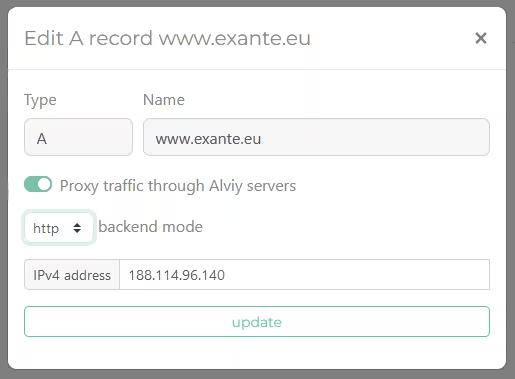
Proxy mode settings
After delegating a zone to Alviy.com, the ability to enable proxy mode becomes available. After generating SSL certificates for the zone on Alviy proxy systems, the editing mode with traffic proxy options is activated:
- Option Proxy traffic redirects traffic to cleaning centers, hiding the target IP address
- backend mode Defines the protocol for communication between Alviy servers and the target web server for active proxy mode. This is either open traffic transmission via http or via encrypted https protocol
How to Use a SaaS Reverse Proxy
Add A and AAAA records for the domain to balance the load between nodes.
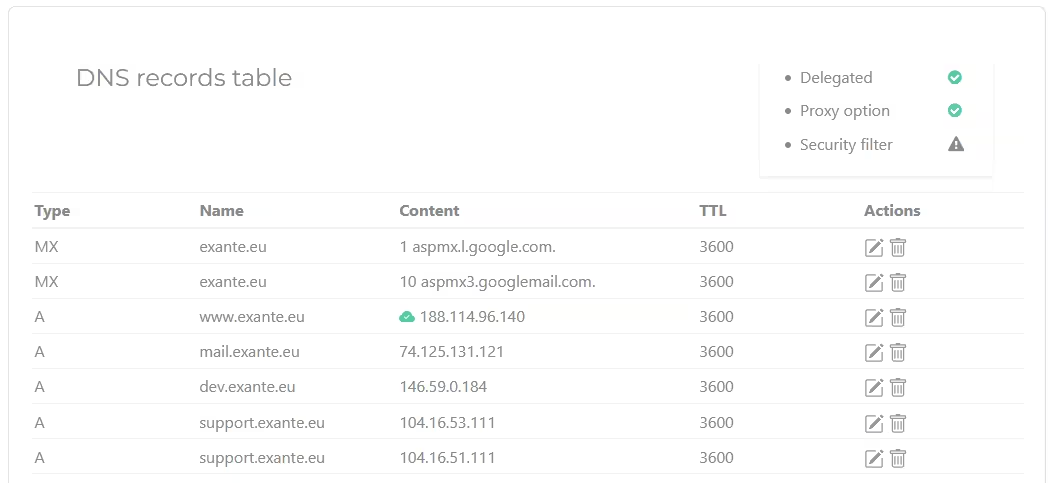
Proxying is available for the following record types:
- A one or more IPv4 addresses
- AAAA servers available in IPv6 space
- CNAME proxying will be automatically enabled for aliases on A and AAAA domains that are already proxied. The action applies to aliases within the current zone
How to start with reverse proxy
Follow these three steps
Ready in a few hours
1. In your Alviy account, create a zone and transfer all DNS records
2. Delegate the domain to Alviy at your domain registrar
3. Wait for SSL/TLS certificates to be created
4. Manage your proxy
14 days of proxy and protection — free
We put your site behind our nodes in Moscow, St. Petersburg and Amsterdam. Pay only if you decide to stay.