DNS records explained
Every time you open a website by its name, your device asks DNS: "what is the IP address of this domain?". The answer is provided by the resource records of the DNS zone — short lines, each of which stores a single fact about the domain: a server address, a mail route, proof of ownership and so on. Let's go through the main record types you will run into when setting up any website.
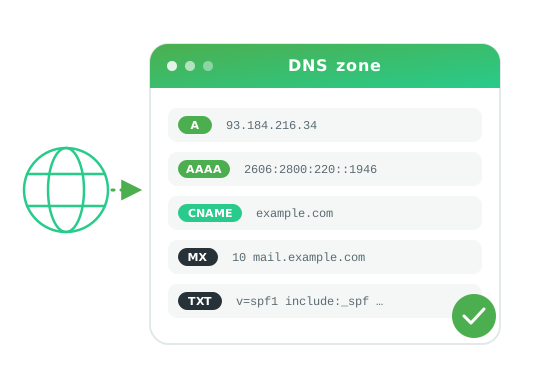
In your Alviy dashboard the zone is edited through a convenient editor: just pick the record type, enter a name and a value. Below is a cheat sheet that helps you understand what each record is responsible for.
A and AAAA — server addresses
The A and AAAA records are the foundation of DNS. They link a domain name to the IP address of the server that hosts the site. The only difference is the protocol version: A points to an IPv4 address (for example, 93.184.216.34), while AAAA points to an IPv6 address (for example, 2606:2800:220:1:248:1893:25c8:1946). A single domain can have several A and AAAA records at once — this is how load is spread across servers.
CNAME — aliases
The CNAME (canonical name) record makes one domain an alias of another. For example, you can make www.example.com an alias of example.com, and then both names will lead to the same site. CNAME is handy when the target address may change: you edit it in one place and all aliases pick up the change automatically. An important limitation: CNAME cannot be placed on the root of a domain (where the NS and SOA records already live), and it cannot coexist with other records of the same name.
MX — mail servers
The MX (mail exchanger) records specify which servers accept mail for the domain. Each MX record has a priority — a number where lower means more important. Mail first goes to the server with the lowest priority, and if it is unavailable — to the next one. This is how resilient mail delivery is achieved.
TXT — free-form text, SPF and DKIM
The TXT record stores arbitrary text information. Most often it is used to protect email and to verify ownership of a domain:
- SPF — a list of servers that are allowed to send mail on behalf of the domain. Helps to fight sender spoofing.
- DKIM — a cryptographic signature of messages, confirming that a message was really sent from your domain and has not been altered.
- Verification — services (search engines, mail, payment systems) often ask you to add a TXT record with a unique value to make sure the domain belongs to you.
NS and SOA — zone management
The NS (name server) records define which DNS servers are responsible for the domain. These are exactly what you specify at the registrar when you delegate a domain to Alviy. The SOA (start of authority) record is a service record; it holds the zone parameters: the primary server, the administrator's e-mail, the zone serial number and refresh timers for secondary servers. These two records are created automatically and form the "skeleton" of any DNS zone.
TTL — how quickly changes take effect
Every record has a TTL (time to live) — the time in seconds for which the answer is cached on intermediate DNS servers. Until the TTL expires, changes to a record are not visible to some of the users. That is why, before migrating a site, the TTL is lowered in advance (for example, to 300 seconds) so that the switch happens almost instantly, and afterwards it is raised back to reduce the load.
| Type | Purpose | Example value |
|---|---|---|
| A | IPv4 address | 93.184.216.34 |
| AAAA | IPv6 address | 2606:2800:220:1::1946 |
| CNAME | Domain alias | example.com |
| MX | Mail server | 10 mail.example.com |
| TXT | Text: SPF, DKIM, verification | v=spf1 include:_spf.example.com ~all |
| NS | Domain's DNS servers | ns1.alviy.com |
| SOA | Zone parameters | ns1.alviy.com admin.example.com … |
Now that you know what each record is for, you can easily configure a domain for your needs — from a simple website to a full-featured mail infrastructure. You can manage all records in one place in Alviy DNS hosting, and when migrating a zone from another operator the editor will automatically find the existing records.